ec2-windowsホストを作ったとき、同じサイズのEBSを複数作ってしもたことがある。
EBSボリュームはデフォルトでNameが空やから、どれがどれかわからんようになってまうやんけ・・・。
作った後に識別する方法がある。これで名前つけられるな。
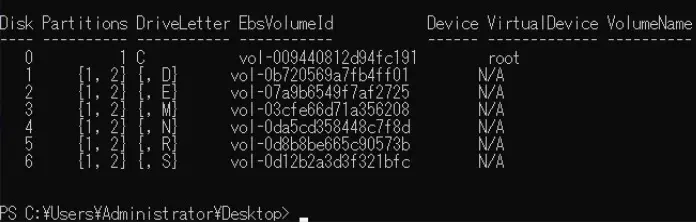
識別のためにpower shellで動かすと、リストが表示できる。
 1
 2
 3
 4
 5
 6
 7
 8
 9
10
11
12
13
14
15
16
17
18
19
20
21
22
23
24
25
26
27
28
29
30
31
32
33
34
35
36
37
38
39
40
41
42
43
44
45
46
47
48
49
50
51
52
53
54
55
56
57
58
59
60
61
62
63
64
65
66
67
68
69
70
71
72
73
74
75
76
77
78
|
# List the disks for NVMe volumes

function Get-EC2InstanceMetadata {
    param([string]$Path)
    (Invoke-WebRequest -Uri "http://169.254.169.254/latest/$Path").Content
}

function GetEBSVolumeId {
    param($Path)
    $SerialNumber = (Get-Disk -Path $Path).SerialNumber
    if($SerialNumber -clike 'vol*'){
        $EbsVolumeId = $SerialNumber.Substring(0,20).Replace("vol","vol-")
    }
    else {
       $EbsVolumeId = $SerialNumber.Substring(0,20).Replace("AWS","AWS-")
    }
    return $EbsVolumeId
}

function GetDeviceName{
    param($EbsVolumeId)
    if($EbsVolumeId -clike 'vol*'){

        $Device  = ((Get-EC2Volume -VolumeId $EbsVolumeId ).Attachment).Device
        $VolumeName = ""
    }
     else {
        $Device = "Ephemeral"
        $VolumeName = "Temporary Storage"
    }
    Return $Device,$VolumeName
}

function GetDriveLetter{
    param($Path)
    $DiskNumber =  (Get-Disk -Path $Path).Number
    if($DiskNumber -eq 0){
        $VirtualDevice = "root"
        $DriveLetter = "C"
        $PartitionNumber = (Get-Partition -DriveLetter C).PartitionNumber
    }
    else
    {
        $VirtualDevice = "N/A"
        $DriveLetter = (Get-Partition -DiskNumber $DiskNumber).DriveLetter
        if(!$DriveLetter)
        {
            $DriveLetter = ((Get-Partition -DiskId $Path).AccessPaths).Split(",")[0]
        }
        $PartitionNumber = (Get-Partition -DiskId $Path).PartitionNumber
    }

    return $DriveLetter,$VirtualDevice,$PartitionNumber

}

$Report = @()
foreach($Path in (Get-Disk).Path)
{
    $Disk_ID = ( Get-Partition -DiskId $Path).DiskId
    $Disk = ( Get-Disk -Path $Path).Number
    $EbsVolumeId  = GetEBSVolumeId($Path)
    $Size =(Get-Disk -Path $Path).Size
    $DriveLetter,$VirtualDevice, $Partition = (GetDriveLetter($Path))
    $Device,$VolumeName = GetDeviceName($EbsVolumeId)
    $Disk = New-Object PSObject -Property @{
      Disk          = $Disk
      Partitions    = $Partition
      DriveLetter   = $DriveLetter
      EbsVolumeId   = $EbsVolumeId
      Device        = $Device
      VirtualDevice = $VirtualDevice
      VolumeName= $VolumeName
    }
  $Report += $Disk
}

$Report | Sort-Object Disk | Format-Table -AutoSize -Property Disk, Partitions, DriveLetter, EbsVolumeId, Device, VirtualDevice, VolumeName
|